

Scopes
Control exactly what your integration can read and write on a company's behalf.
A scope is a permission that grants an API token access to a set of resources and actions, often spanning several endpoints. Scopes let you request capabilities — "read time off" — rather than individual URLs.
Request only the scopes you need. A token that reads time off and nothing else should hold timeoff:read, not full access.
How scopes are evaluated
Every endpoint accepts a set of scopes, and your token needs any one of them. Three rules follow:
Write implies read. An endpoint that reads employments accepts employment:read or employment:write. If you already hold write, you do not need to request read as well.
Read does not imply write. A token holding timeoff:read cannot create a time-off request.
Category scopes cover their children. A category scope such as time_and_attendance grants every scope inside it. Prefer individual scopes unless you genuinely need a whole area.
Scopes are checked before Remote processes your request body, so a call your token cannot make changes nothing.
Blanket scopes
| Scope | Grants |
|---|---|
all:read | Read access to everything the token's owner can read. |
all:write | Full read and write access to everything the token's owner can do. |
⚠️
https://gateway.remote.com/company.manageis deprecated. It grants full read and write access to every endpoint, writes included. Do not use it for new integrations — request the specific scopes your integration needs instead.
Requesting scopes as a partner
Pass a space-separated list to the scope parameter of the Authorization Code Flow:
scope=employment:read timeoff:read expense:writeURL-encoded, that becomes:
scope=employment%3Aread%20timeoff%3Aread%20expense%3AwriteThe same scope field is accepted when you create a company with partner credentials.
⚠️ Omitting
scopegrants full access. Leavescopeout and your token is issued withall:write. Always request explicit scopes.
Generating a token as a customer
Company admins generate tokens in the Remote dashboard and pick scopes from the same catalogue.
- Go to Company Settings, then Integrations and APIs, then Manage API, then Generate API token.
- Give the token a name. Names do not need to be unique — tokens are identified by Token ID.
- Under Endpoint Collections, choose Read only, Full access, or Custom endpoints to select individual read or write permissions.
- Select Generate API Token, having agreed to the Remote API Terms of Use.
- Your API settings then show the token's Name, Status, Token ID, Created By and Created Date.
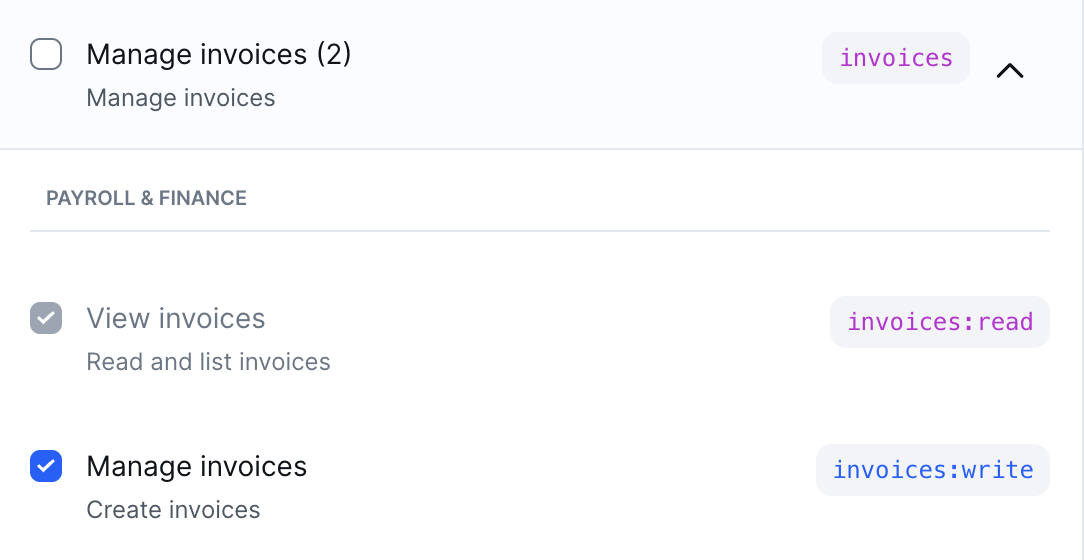
Selecting an endpoint with write access automatically selects its read counterpart, matching the "write implies read" rule above.
Worked examples
Read only. A Benefits Coordinator who only views benefits information needs View benefit offers (benefit_offer:read) and View benefit renewals (benefit_renewal:read).
Write access. A Payroll Manager managing invoices needs both View invoices (invoices:read) and Manage invoices (invoices:write).
Finding the scope you need
Scope names follow a resource:action convention — timeoff:read, employment:write, invoices:read.
ℹ️ To find the scopes a specific endpoint needs, look that endpoint up in the API reference. Every endpoint lists the category, read and write scopes it accepts. That table is generated from the source, so it is always current — it is the authoritative place to check.
Use a category scope when your integration genuinely needs a whole area of the product:
| Category scope | Covers |
|---|---|
employments | Employments, contracts, amendments, onboarding and offboarding, custom fields, work authorization |
time_and_attendance | Time off and timesheets |
payroll | Payroll runs, payroll calendars, pay items, payslips |
invoices | Invoices |
employment_payments | Expenses and incentives |
employment_documents | Documents, probation and travel letters, identity verification, payslips |
company_admin | Company details, departments, managers, structure, currencies, webhooks, SSO configuration |
Troubleshooting
A call your token lacks the scope for returns 403 and names exactly what would have worked:
{
  "message": "Forbidden, missing required scope (one of): https://gateway.remote.com/company.manage, timeoff:write, time_and_attendance, all:write got: employment:read, timeoff:read"
}
Any value in the one of list satisfies that endpoint. An existing token's scopes cannot be widened — generate a new token, or re-run the Authorization Code Flow requesting the scope you need.
Updated 2 months ago